

Every data model you create in Cargo is stored as a table in your connected data warehouse. You can query these tables directly using SQL—whether from your own BI tools, data pipelines, or within Cargo to create new SQL-based models.

Table naming conventions

Cargo follows specific naming patterns for your data model tables. The format depends on your warehouse scope configuration.

Database scope

[DATABASE].datasets_[CONNECTOR_SLUG].models_[MODEL_SLUG]
Example: If your database is CARGO_DB, your connector slug is crm, and your model slug is companies:
SELECT * FROM CARGO_DB.datasets_crm.models_companies

Schema scope

If you configured schema-level scope when setting up your warehouse:
[DATABASE].[SCHEMA].datasets_[CONNECTOR_SLUG]__models_[MODEL_SLUG]
Notice the double underscore (__) between the connector slug and models when using schema scope.

Query examples

Basic query

SELECT
  company,
  website,
  funding_amt,
  funding_type
FROM CARGO_DB.datasets_file.models_abm_raw
WHERE funding_amt > 1000000

Joining multiple models

Combine data from different Cargo models:
SELECT
  a.company,
  a.website,
  b.enrichment_data,
  c.activity_score
FROM CARGO_DB.datasets_crm.models_companies a
LEFT JOIN CARGO_DB.datasets_enrichment.models_company_data b
  ON a.domain = b.domain
LEFT JOIN CARGO_DB.datasets_analytics.models_scores c
  ON a.company_id = c.company_id

Aggregations

SELECT
  company,
  website,
  SUM(deal_value) as total_pipeline,
  COUNT(*) as deal_count
FROM CARGO_DB.datasets_crm.models_deals
WHERE stage != 'Closed Lost'
GROUP BY company, website
HAVING SUM(deal_value) > 10000

Creating SQL models

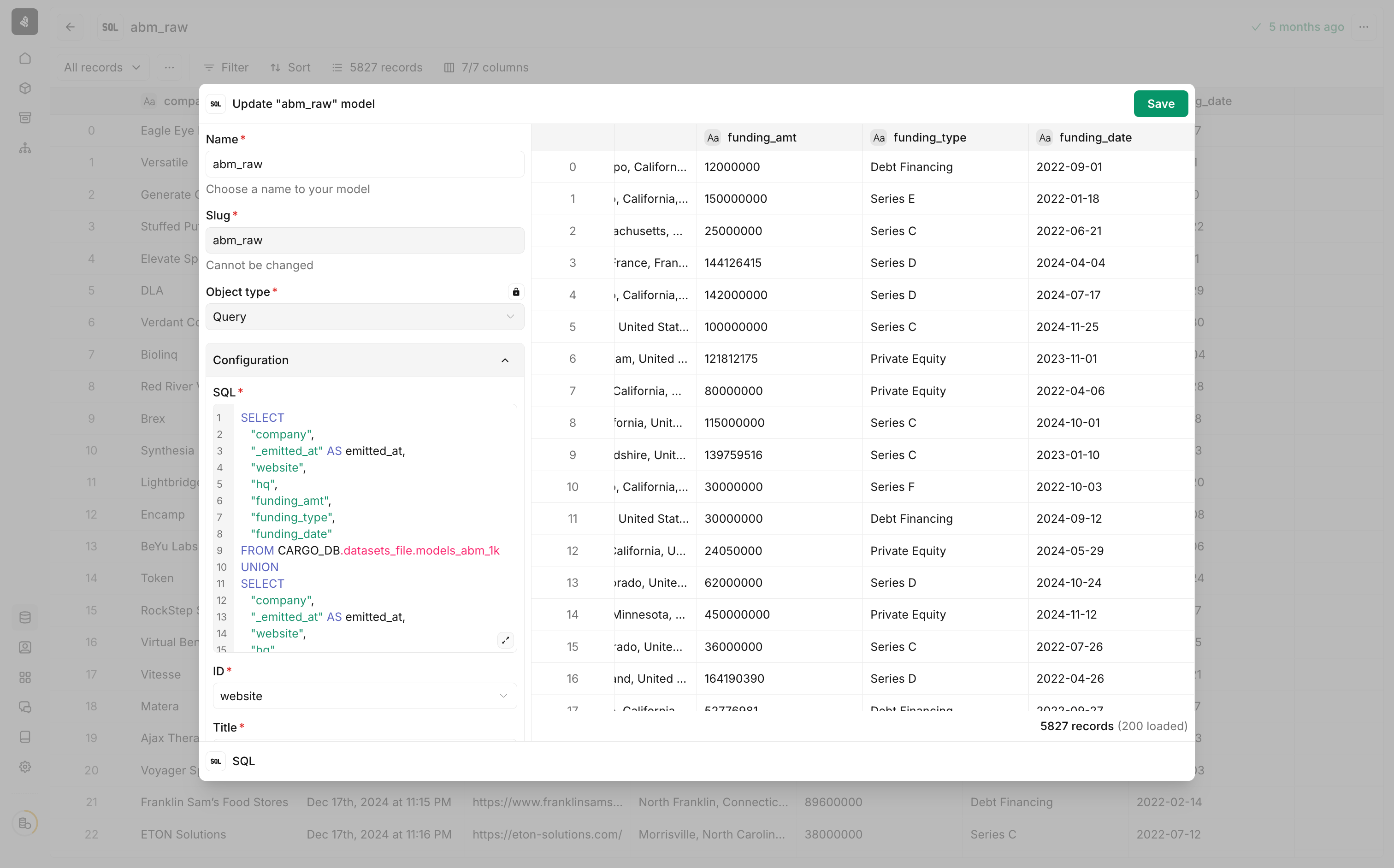
You can create new Cargo data models by writing SQL queries against your existing tables. This is useful for combining data from multiple sources, applying transformations, or creating aggregated views. SQL model configuration
1

Add a new SQL model

Navigate to your data models and create a new model. Select SQL as the object type.
2

Write your SQL query

Write a query that selects data from your existing Cargo tables using the naming conventions above.
SELECT
  "company",
  "_emitted_at" AS emitted_at,
  "website",
  "hq",
  "funding_amt",
  "funding_type",
  "funding_date"
FROM CARGO_DB.datasets_file.models_abm_lk
Do not include _id, _time, or _title columns in your query—these are system columns that Cargo generates automatically based on your column mapping.
3

Configure column mapping

Map the required columns:
  • ID — The unique identifier for each record
  • Title — A human-readable label for records
4

Preview and save

Preview the query results to verify your data, then save the model.

Next steps